Project Name: DataFlow
Data Science Dashboard with sklearn, multiple linear/logistic regression, ensemble learning, data cleaning, and data visualization.
Overview:
Having recently completed the Google Advanced Data Analytics Professional track, I thought it would be a great idea to continue cultivating my new data science skills. Like the MLDash project, this project uses previous work as a starting point, and iterative development will take place as a series of enhancements. The state of the code before and after each enhancement is provided to illustrate code evolution. A chronologically ordered update summaries can be easily viewed in the narratives section below.
Initial Commit
You can view the code for the initial commit at Origin.
Purpose
The original purpose of the base code is data analyis focused on building a XGBoost model (using decision trees as base learners) that predicts whether an employee will leave the company. Conducting EDA (“exploratory data analysis”) revealed that the data had exceptionally high variance with a large proportion of the data falling outside of the IQR maxima and minima. After one-hot encoding categorical values and cleaning the dataset, it became clear that the initial approach to modeling the data should employ a model that is resistant to the effects of outliers and variance. Thus, an XGBoost model was used, with decision trees as base learners. The strategy was to use such a model to provide a good measure of feature importance for successfully predicting an employee leaving the company (a binary classifier problem). Feature importance is then used to select a reduced set of features for use in a multiple logistic regression model.
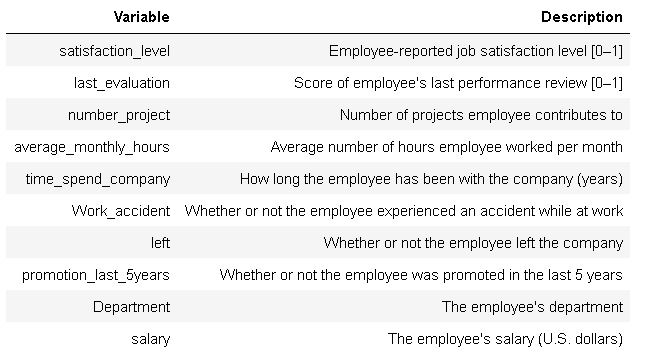
Description of Variables
Key Code Samples
# Rename columns as needed
df0.rename(columns={'time_spend_company': 'tenure'}, inplace=True)
df0.rename(columns={'average_montly_hours': 'average_monthly_hours'}, inplace=True)

# Convert categorical variable to numerical type using one-hot encoding
df1 = df0.copy()
df1 = pd.get_dummies(df1, drop_first = True)

# Display all column names after the update
columns = df1.columns.tolist()
for column in columns:
    print(column)
Column Names After One-Hot Encoding:
- satisfaction_level
- last_evaluation
- number_project
- average_monthly_hours
- tenure
- Work_accident
- left
- promotion_last_5years
- Department_RandD
- Department_accounting
- Department_hr
- Department_management
- Department_marketing
- Department_product_mng
- Department_sales
- Department_support
- Department_technical
- salary_low
- salary_medium
#Define the y (outcome) variable.
y = df1['left']

# Define the X (predictor) variables.
X = df1.copy()
X = X.drop(['left'], axis = 1)

# Perform the split operation on your data.
X_train, X_test, y_train, y_test = train_test_split(X, y, test_size = 0.25, random_state = 0)

# Define xgb to be your XGBClassifier.
xgb = XGBClassifier(objective='binary:logistic', random_state=0)

# Define parameters for tuning as `cv_params`.
cv_params = {'max_depth': [10],
              'min_child_weight': [0.75, 0.8, 0.85],
              'learning_rate': [0.375, 0.4, 4.225],
              'n_estimators': [10],
              'subsample': [1, 2 ,10],
              'colsample_bytree': [0.6, 0.65, 0.75]
              }

# Define your criteria as `scoring`.
scoring = {'accuracy', 'precision', 'recall', 'f1'}

xgb_cv = GridSearchCV(xgb, cv_params, scoring = scoring, cv = 5, refit = 'f1', n_jobs = -1, verbose=True)


%%time
# fit the GridSearch model to training data
xgb_cv = xgb_cv.fit(X_train, y_train)
xgb_cv
Data Visualizations Used
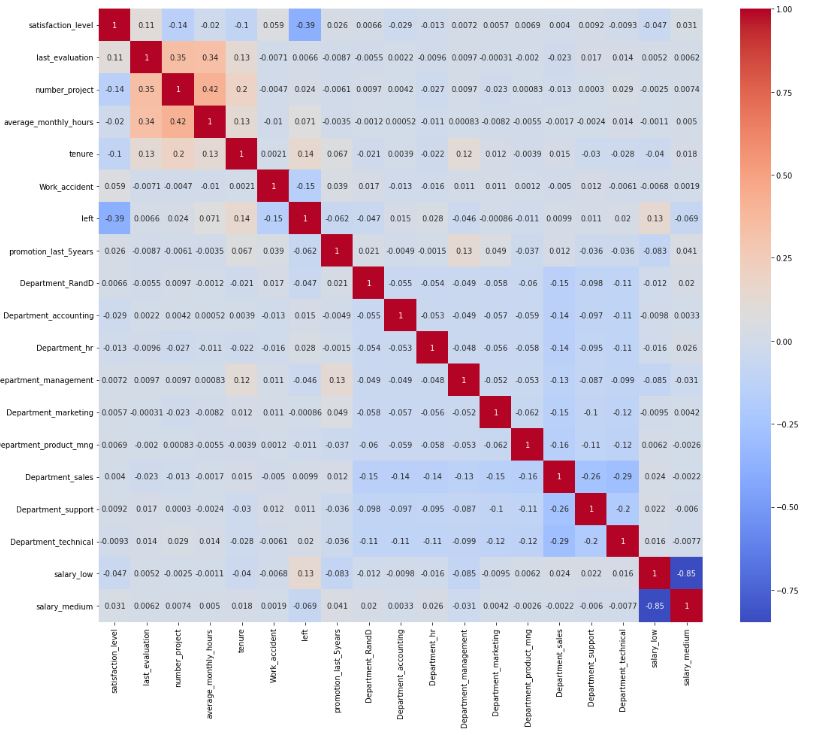
Heatmap of Correlations Between Variables
The heatmap shows pairwise correlations between model features, including the target variable “left”
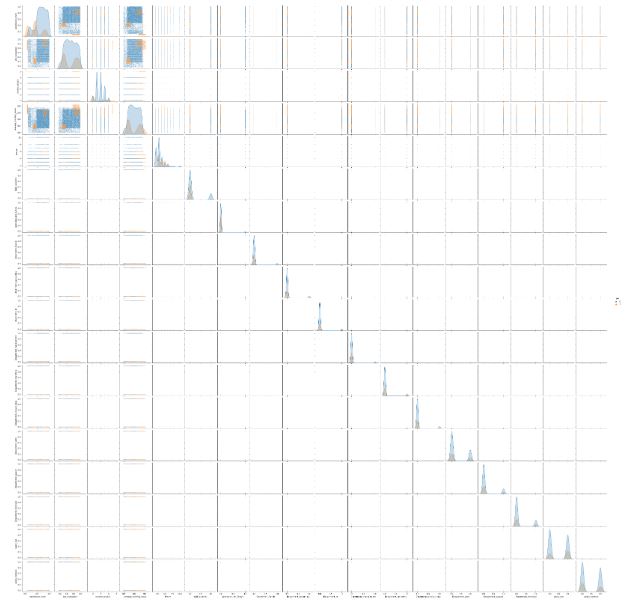
Pearson Correlation Matrix
Pearson correlation between model features, using hue value to indicate whether the target variable (“left”) is true or false for each data point
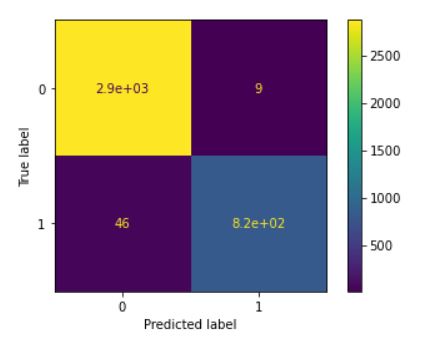
Confusion Matrix for Model Predicting Employee Departure
The confusion matrix is a helpful way to augment analysis of evaluation metrics. It provides the number of predictions made by the model, categorized in True Positives, True negatives, False Positives, and False Negatives. These values are used to compute accuracy, precision, recall, and F1 scores.
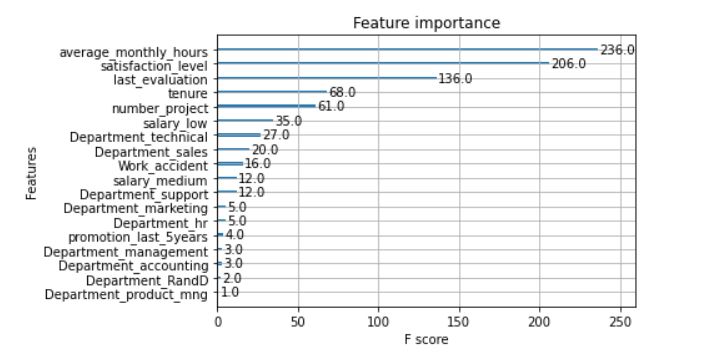
Relative Feature Importance
The tuned XGBoost model has exceptional performance, and can be considered reliable. The resulting graph of relative feature importance informs the selection of features for a multiple logistic regression binary classifier model.