
Project Name: MLDash
Machine Learning Dashboard using OpenAI Gym, Tensorflow, Keras, MongoDB, and JupyterDash.
Overview:
MLDash is a Jupyter Dash application that performs analysis on a reinforcement learning algorithm’s hyperparameters and relative performance; it then writes training data to a MongoDB database (for multi-session persistence) and calls data into Pandas dataframes and data visualizations as queried, according to interactive dashboard interface elements that allow users that don’t write code to train an AI model. Users can select their own usernames and passwords which are never stored or transfered in an unencrypted form.
Project files:
Links to the code at various stages of development can be found below, under the Artifacts Section
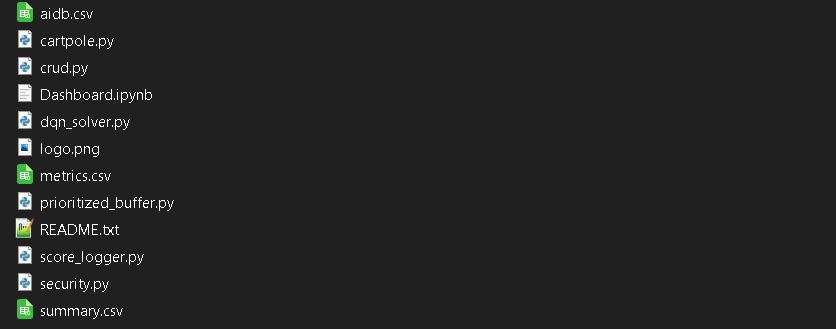
(Note: The aidb.csv file is not a required part of the code, but holds sample data that can be uploaded to MongoDB to allow potential users to examine the program’s functionalty without having to commit to training sessions that could each take hours. The summary.csv file is not read by the program, but stores a single record in the summary collection that describes an overview of the performance for each successful session.)
The initial code review (informal) can be viewed here or on YouTube.
Professional Self-Assessment
The MLDash project was a challenging but rewarding exercise of the skills I have developed throughout the pursuit of my BS in Computer Science. I chose to integrate two code artifacts and repurpose their functionality to showcase some of my skills in software engineering, machine learning, and data science. Additionally, the chosen artifacts represent work done in software design and engineering, algorithms and data structures, and databases. Enhancements to the artifacts were made according to a well-considered plan, with additional research and continuous feedback integration throughout development, resulting in novel functionality and greatly enhanced utility. The MLDash artifact was completed in 8-weeks and there are many anvenues for further upgrade, with further iterative development coming soon.
For this project I chose to work with code that is Python-compatible, using Jupyter Dash for interface, MongoDB for data storage and retrieval, Tensorflow with Keras for the core algorithm and data generation, and a variety of Python-based solutions to facilitate software integration and additional functionality. One of the most useful things a software engineer can do for users is to make complicated tools simple to use and user friendly. Training artificial intelligence models is a task that is difficult to understand and which can consume a lot of time. Additionally, keeping track of the relative performance of different versions of a model can be tedious or even intractable. The impetus behind MLDash is the simplification of this process. Record keeping is automated, and viewing the backend code is optional. Data from successful training sessions can be viewed in a filter-enabled data table, accompanied by data visualization graphics that make understanding the relationship between hyperparameters and performance metrics more intuitive. Training sessions completed by others can be uploaded to the MongoDB database to facilitate collaboration in the task of discovering the optimal combination of hyperparameters to produce the best model performance. Code documentation saw significant contributions in the form of code comments and a README file that includes detailed information about system requirements, dependency versions, and installation instructions. The code for MLDash was made more modular and object oriented through the conversion of new and existing functions into classes; this contributed to a more elegant integration of the primitive artifacts and allows other people to understand the code more easily. Regular updates on my progress were provided to my instructor which delineated the progress made, problems encountered, and the near-term and long-term direction of the project.
In the category of software development and engineering, I successfully integrated two distinct programs, added additional functionality, upgraded existing functionality, and designed the MLDash application based on the requirements of target users (novices to artificial intelligence that want entry-level exposure to the technology). The development of additional classes and the refactoring of code contributed to enhanced organization and interoperability between code files, resulting in code that is significantly more object oriented. The application interface was redesigned to accomodate the repurposed functionality and the needs of target users. Iterative testing with continuous feedback integration was performed througout development.
Login Page:

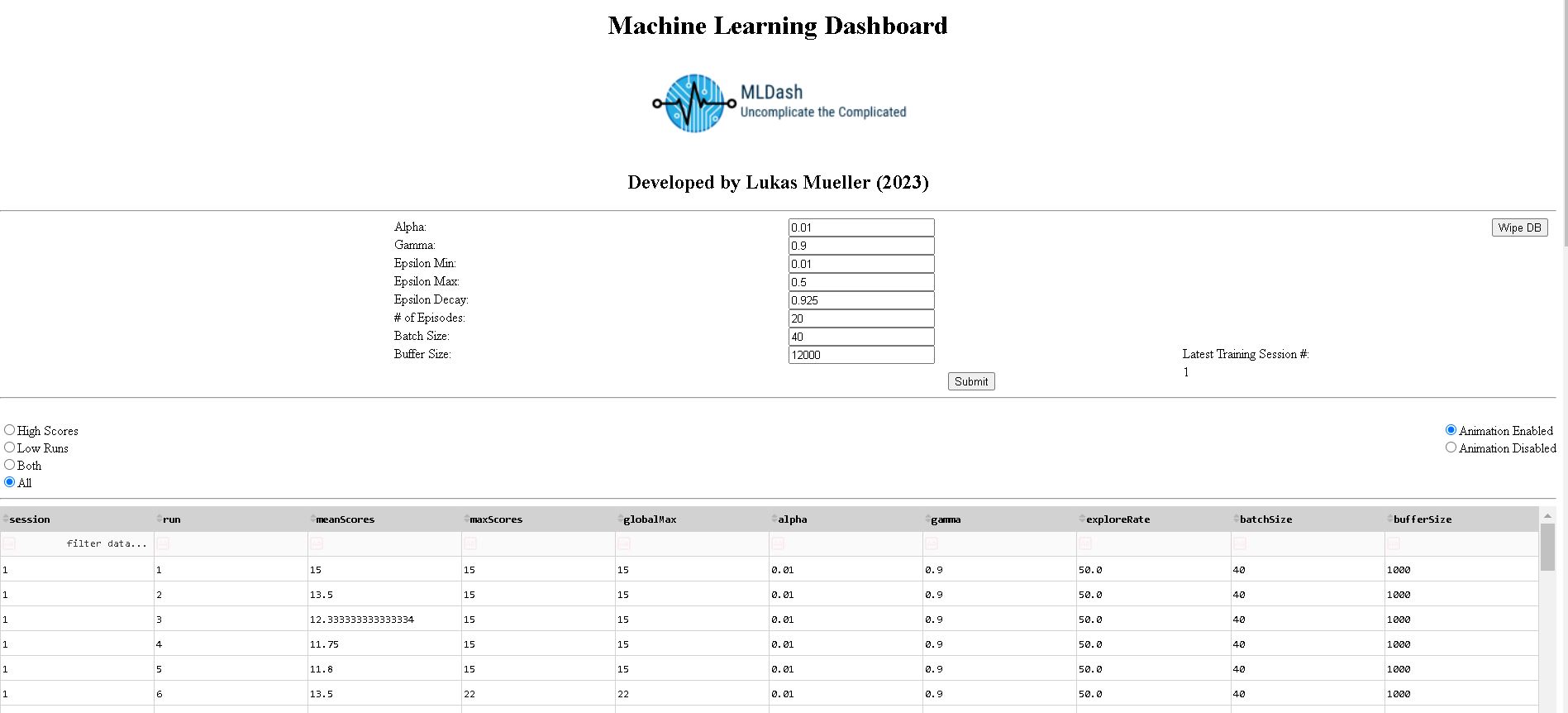
MLDash Interface:
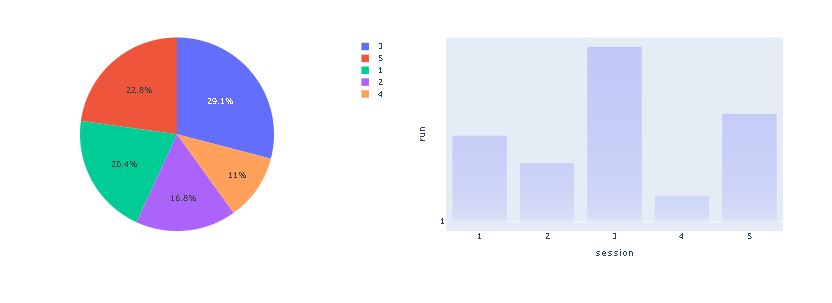
Data Visualization Charts (Session Comparison, No Filtering):
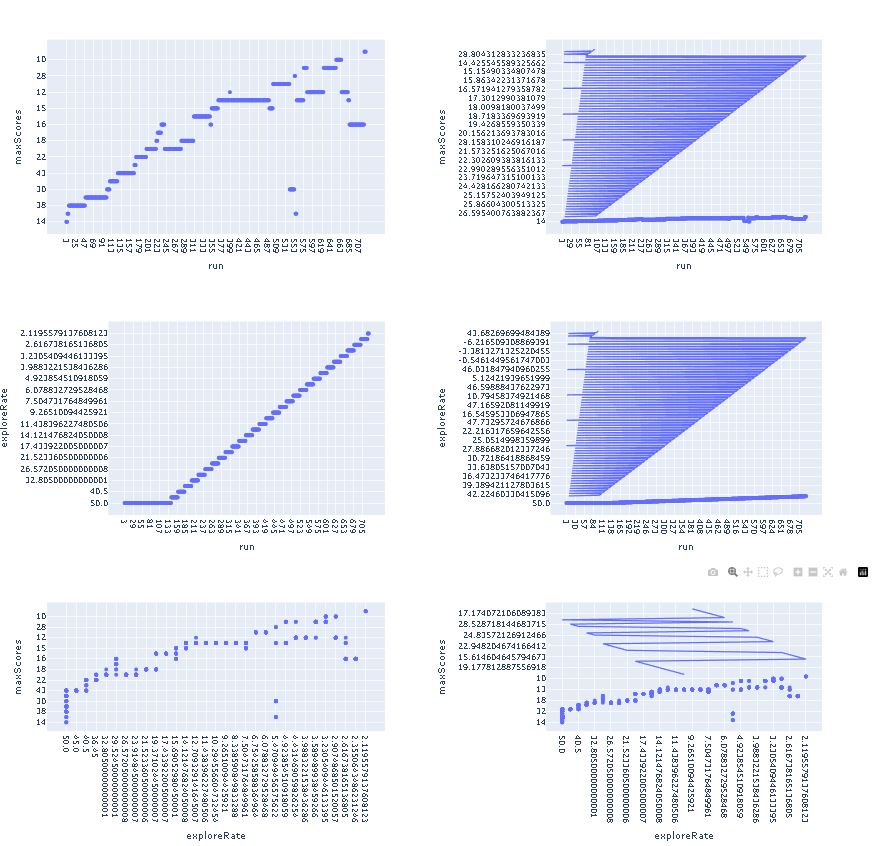
Data visualization Charts (Charts That Respond to Metrics Filtering):
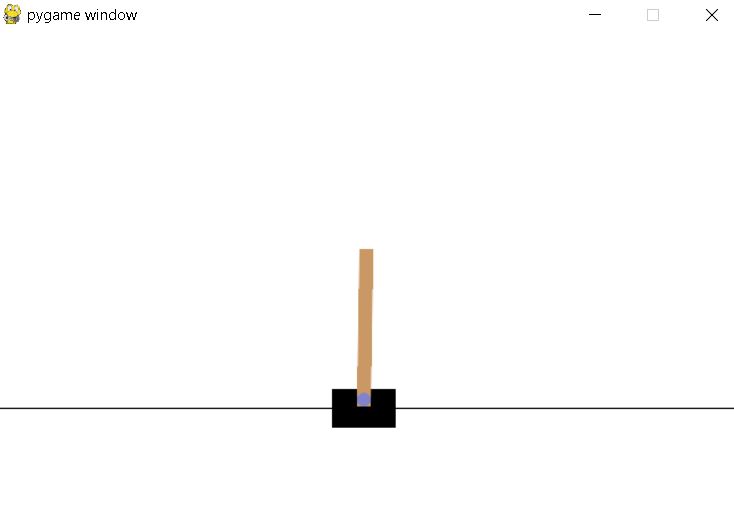
During Training, an animation of the learning model’s efforts is displayed (Users can enable or disable this via a dashbord toggle interface element):
In the category of algorithms and data structures, I overhauled the reinforcement learning algorithm’s core method of learning from its own experiences. The MLDash artifact does not perform random sampling of its experiences to learn, but instead performs prioritized sampling which identifies experiences that did not conform to the model’s predictions, and emphasizes these experiences, to form a better predictive model (another effect of this implementation was a significant reduction in the amount of memory needed to solve the reinforcement learning problem, reducing the required amount of combined physical RAM and virtual memory from 80-100GB to 16-32GB, a 2.5 to 6.25 reduction factor). Additional improvements in memory efficiency were gained through the use of an alternative neural network optimizer. While the RMSprop optimizer is slightly less accurate than the Adam optimizer, it only uses about a third of the memory due to different methods of computing moving averages (The slight loss in accuracy was more than compensated for by the upgraded sampling method, and limiting memory consumption is of paramount importance if the program is to be useful for the target audience, who may not have extraordinary computer hardware at their disposal). The code for the PrioritizedBuffer class can be seen here:
from collections import namedtuple, deque
import numpy as np

Experience = namedtuple('Experience', 'state action reward next_state terminal priority')

class PrioritizedBuffer:
# Initialize a prioritized replay buffer with given buffer size and hyperparameters
    def __init__(self, batch_size, buffer_size, alpha=0.6, beta=0.6):
        # Create a deque object to store transitions with maximum length of buffer_size
        self.buffer = deque(maxlen=buffer_size)
        # Hyperparameter for prioritizing high initial error transitions
        self.alpha = alpha
        # Hyperparameter for incorporating importance sampling correction into the gradient
        self.beta = beta
        # Initialize a numpy array to store the priorities of transitions initially set to zero
        self.priorities = np.zeros((buffer_size,), dtype=np.float32)
          # Initialize an index for assigning priorities and storing transitions
        self.index = 0

    def add(self, state, action, reward, next_state, is_terminal):
        # Calculate the priority for the new transition by selecting the maximum priority of all transitions currently in the buffer (if any), or setting it to 1.0 if the buffer is empty
        priority = max(self.priorities) if self.buffer else 1.0
        # Create a new experience object representing the transition and assign it the calculated priority
        experience = Experience(state, action, reward, next_state, is_terminal, priority)
        # Add the experience to the buffer
        self.buffer.append(experience)
        # Assign the same priority to the corresponding entry in the priorities array
        self.priorities[self.index] = priority
        # Increment the index for the next element in the priorities array, wrapping around if necessary
        self.index = (self.index + 1) % len(self.buffer)
        return

    def get_prioritized_indices(self, batch_size):
        # Compute the sampling probabilities for each transition using their respective priorities and the alpha hyperparameter
        probabilities = self.priorities**self.alpha
        # Normalize the probabilities so they sum to 1
        probabilities /= probabilities.sum()
        # Sample indices from the buffer using the computed probabilities
        indices = np.random.choice(len(self.buffer), batch_size, p=probabilities)
        # Compute the importance-sampling weights for the sampled transitions using their probabilities and the beta hyperparameter
        weights = (len(self.buffer) * probabilities[indices])**(-self.beta)
        # Normalize the weights so they are between 0 and 1
        weights /= weights.max()
        # Return the sampled indices and their corresponding weights
        return indices, weights

    def update_priorities(self, indices, td_errors):
        # Updates the priority of the transitions at the given indices
        for i, index in enumerate(indices):
            self.priorities[index] = abs(td_errors[i])
        return

    def __len__(self):
        # Returns the number of transitions in the buffer
        return len(self.buffer)
In the category of databases, the CRUD database functionality (create, read, update, and delete) was upgraded to include write capabilities. During reinforcement learning, hyperparameters and performance metrics are written to a CSV file; if the model is successful, the CSV file is read into a Python dictionary (equivalent to a C++ hash table) and written to the MongoDB database. Data written to the database appears in the interface as an interactive data table and interactive charts, allowing users to make observations about the relative performance of different model instances, as well as the performance of individual instances, as well. The code for the MLMongo class is shown here:
import pandas as pd
from pymongo import MongoClient
import csv

class MLMongo(object):
    """ CRUD operations for MLDash metrics in MongoDB """

    def __init__(self, security_object, encoded_username, encoded_password):
    # Initializing the MongoClient. This helps to access the MongoDB databases and metrics.

        self.securityObject = security_object
        self.username, self.password = self.securityObject.xor_decode(encoded_username, encoded_password)
        self.authenticated = False
        self.connection_string = 'mongodb://' + self.username + ':' + self.password + '@localhost:27017/TRAIN?authMechanism=SCRAM-SHA-256'
        self.client = MongoClient(self.connection_string) #client
        self.database = self.client['TRAIN']    #database

        self.metrics = self.database['metrics'] #collection
        self.summary = self.database['summary'] #collection
        self.metrics_file = 'metrics.csv'
        self.summary_file = 'summary.csv'


    # Create method to implement the C in CRUD.
    def create(self, data):
        #definition criteria provided, else throw exception
        if data is not None:
            is_dict = False
            #Make sure that the data parameter is of type dict, insert acceptable data into database
            if isinstance(data, dict):
                is_dict = True
                self.database.login.insert(data)
            else:
                raise TypeError("The data entered is not of type dictionary")
        else:
            raise Exception("Nothing to save, because data parameter is empty")
        #Return boolean indicating whether data parameter type was acceptable
        return is_dict


    #method that returns a cursor/pointer, pointing to a list of results
    def read_all(self, data):
        #Search criteria provided, else throw exception
        if data is not None:
            #Make sure that the data parameter is of type dict, return the cursor pointing to list
            if isinstance(data, dict):
                cursor = self.database.metrics.find(data, {"_id": False})
                return cursor
            else:
                raise TypeError("The data entered is not of type dictionary")
        else:
            raise Exception("No cursor to return, because data parameter is empty")


    # Method to implement the R in CRUD.
    def read(self, data):
        #Search criteria provided, else throw exception
        if data is not None:
            #Make sure that the data parameter is of type dict, return the first document found
            if isinstance(data, dict):
                data = self.database.metrics.find_one(data)
                return data
            else:
                raise TypeError("The data entered is not of type dictionary")
                data = False
        else:
            raise Exception("Nothing to read, because data parameter is empty")
            data = False


            #function that performs the U in CRUD; will accept ANY valid search query and update using _id
    def update(self, lookup, updateData):
        if lookup is not None:
            if isinstance(lookup, dict):
                ident = self.database.metrics.find_one(lookup)
                revision = ident.get('_id')

                if updateData is not None:
                    if isinstance(updateData, dict):
                        self.database.metrics.update_one({"_id" : revision},{"$set": updateData})
                        updated = self.database.metrics.find_one({"_id" : revision})
                        return updated
                    else:
                        raise TypeError("The update data entered is not of type dictionary")
                else:
                    raise Exception("Nothing to read, because the update data parameter is empty")
            else:
                raise  TypeError("The lookup data entered is not of type dictionary")
        else:
            raise Exception("Nothing to read, because the lookup data parameter is empty")


    #performs the D in CRUD
    def delete(self, lookup):
        if lookup is not None:
            if isinstance(lookup, dict):
                ident = self.database.metrics.find_one(lookup).get('_id')
                self.database.metrics.delete_one({'_id' : ident})
                return False
            else:
                raise  TypeError("The lookup data entered is not of type dictionary")

        else:
            raise Exception("Nothing to read, because the lookup data parameter is empty")


    # This function reads CSV data into a Python dictionary, and inserts each row into the appropriate collection as a record
    def import_csv(self, csv_file, csv_fields):
            with open(csv_file, 'r', newline='') as csvfile:
                csvreader = csv.DictReader(csvfile, fieldnames=csv_fields)
                for row in csvreader:
                    if csv_file == 'metrics.csv':
                        self.database.metrics.insert_one(row)
                    elif csv_file == 'summary.csv':
                        self.database.summary.insert_one(row)
                    else:
                        print("The file being written to the database is not recognized. Aborting write operation.")

            return


    #This method allows a user to clear the mongoDB backend databases
    def clear_collections(self):
        result = self.database.metrics.delete_many({})
        print(f"{result.deleted_count} documents deleted from {self.metrics} metrics in {self.database} database.")
        result = self.database.summary.delete_many({})
        print(f"{result.deleted_count} documents deleted from {self.summary} metrics in {self.database} database.")


    # definintion of a custom 'is_authenticated' function
    def is_authenticated(self):
        try:
            # test authentication by pinging the database server
            self.database.command('ping')
            return True
        except OperationFailure as err:
            print (f"Authentication operation failed due to: {err}. \nPlease enter valid credentials.")
            exit()
        except Exception as e:
            print("Exception was thrown: {e}. \nPlease contact the developer.")
            exit()
In the category of security, the database authentication string was upgraded to require the use of the SCRAM-SHA-256 authentication mechanism, and the code was modified so that the authentication credentials used in the connection string were not stored in the code itself. The interface was modified to prompt users for a valid username and password, which are specified by a MongoDB admin user; the main content of the program is not displayed until a user successfully authenticates. A security class was created, the instances of which utilized a cryptographically secure single-use byte sequence, derived from Python’s secrets library. The secure byte-sequence is truncated to the length of both the username and password input byte-translations, and the credentials are XORed against the relevant variable length sequence, then converted to hexidecimal. The encoded credentials and security object are then used to create a CRUD-capable MongoDB agent object, which decodes the credentials and inserts them into the database connection string. The code then attempts to ping the database server, only giving the user access to the main dashboard content when the ping operation is successful. Exception handling was used throughout the code, where needed, and Python-specific methods were used when opening files that ensure they are closed automatically after use. The Security class is shown in full detail here:
import secrets

class Security(object):
    def __init__(self):
        #generate random xor key
        #Using 32 bytes or more ensures that the number generated is cryptographically secure
        self.binary_key = secrets.token_bytes(32)


    def xor_encode(self, username, password):
        if username is not None:
            if password is not None:
                # Convert username and password to byte strings
                username_bytes = bytes(username, 'utf-8')
                password_bytes = bytes(password, 'utf-8')

                # Get length of username and password
                u_length = len(username_bytes)
                p_length = len(password_bytes)

                # Perform XOR operation on corresponding bytes
                u_binary_key = self.binary_key[:u_length]
                p_binary_key = self.binary_key[:p_length]
                u_encode_bytes = bytes([a^b for a, b in zip(username_bytes, u_binary_key)])
                p_encode_bytes = bytes([a^b for a, b in zip(password_bytes, p_binary_key)])

                # Convert output to hexadecimal string
                u_encode_hex = u_encode_bytes.hex()
                p_encode_hex = p_encode_bytes.hex()
            else:
                return (f'The username was empty')
        else:
            return (f'The username was empty')

        return u_encode_hex, p_encode_hex


    def xor_decode(self, username_hex, password_hex):
        # Convert hexadecimal string to byte string
        user_bytes = bytes.fromhex(username_hex)
        pass_bytes = bytes.fromhex(password_hex)

        # Get length of username and password
        u_length = len(user_bytes)
        p_length = len(pass_bytes)

        u_binary_key = self.binary_key[:u_length]
        p_binary_key = self.binary_key[:p_length]
        u_decode_bytes = bytes([a^b for a, b in zip(user_bytes, u_binary_key)])
        p_decode_bytes = bytes([a^b for a, b in zip(pass_bytes, p_binary_key)])

        # Convert output to original string
        u_decode_string = u_decode_bytes.decode('utf-8')
        p_decode_string = p_decode_bytes.decode('utf-8')

        return u_decode_string, p_decode_string
While I have worked on many coding projects throughout my academic career, I found the MLDash project to be particularly rewarding. The Pythonic combination of artificial intelligence, database manipulation, data visualization, software engineering, and secure coding was one that will help me to prepare for even more challenging projects in my chosen career as a machine learning engineer. My skills in planning, research, communication, and time management also contributed to the overall success of my code enhancement plan for the project. As I continue to develop my skills in computer science, I will use what I have learned to make significant contributions to the teams and organizations I work with, and I look forward to what the future will bring.
Artifacts
The MLDash Github repository contains 5 snapshots of the MLDash application that span the development process (documentation added throughout development). The Dashboard and Cartpole artifacts are combined into the basis of the MLDash artifact during Enhancement 1. Here are links to all of the code:
Origin - The Cartpole program and the Dashboard program, before any integration or upgrades
Enhancement 1 - Software Design and Enginering (Requirements Analysis, Software Integration, Interface Design)
Enhancement 2 - Algorithms and Data Structures (Optimization of speed and memory consumption)
Enhancement 3 - Databases (Expansion of database and data handling capabilities)
MLDash - The most recent iteration of the final artifact (Security upgrades, interface improvements, and final polishing)
Highlights
The MLDash program is centered around the Dashboard.ipynb file. This file creates instance of the following classes:
MLMongo (defined in crud.py, to initiate a connection to a local MongoDB service)
Security (to facilitate secure access control)
Cartpole (To initiate the reinforcement learning algorithm)
The the Cartpole object then creates instances of the following classes:
DQNSolver (for the learning model setup, and learning procedures)
PrioritizedBuffer (an upgraded sampling procedure that makes experience replay a non-arbitrary process)
ScoreLogger (to record hyperparameters and performance metrics)
During training, hyperparameter values and performance metrics are written to the metrics.csv file. The metrics collection and summary collection are contained in the MongoDB TRAIN database. When the model successfully balances the pole (for a minimum average duration) the metrics.csv file that contains training data is read into a Python dictionary and written to the TRAIN/metrics database collection. Once the database has been populated with training data, users can view this data using the dashboard. The dashboard allows the data to be viewed in the form of an interactive data table and dynamic data visualizations. Users have the ability to filter data to examine summary data and individual training sessions, and the accompanying charts change along with the data table.
Additional functions were added to the crud.py, score_logger.py to facilitate local storage of learning model training data, and the ability to write this data to a persistent database. The Dashboard.ipynb file was upgraded to provide a relevant and task-specific interface with enhanced interactivity, dataframe filtering, data session indexing, and data visualization capabilities.
The learning algorithm itself enjoyed a significant upgrade that improved its ability to learn from its experiences. During experience replay (code found in dqn_solver.py) the batch sampling method was upgraded from using a random sampling procedure to using a prioritized sampling mehtod (code found in the prioritized_buffer.py file), resulting in a more effective implementation of the learning algorithm and contributing to a significant reduction in total memory use.
A custom Security class implements credential security before the credentials are passed in the database connection string, which is then secured with SCRAM-SHA-256.
Interface elements such as GPU indicator, latest session indicator, wipe database button, and animation toggle were added to enhance user experience.
Narratives
Check out my blog posts (narratives), below, to learn more about my coding journey… or jump to a particular narrative using these links:
- Initial enhancement plan
- Enhancement #1 Narrative: Software Development and Engineering
- Enhancement #2 Narrative: Algorithms and Data Structures
- Enhancement #3 Narrative: Databases
- Further Enhancements: Security, Interface, and Polishing
- Course Objectives and Outcomes
Enjoy!
This site was built using GitHub Pages